Repeater Console

 AllStar · Flowlive
AllStar Flow — what you're looking at
The live audio path of the White Tanks repeater system. When anyone transmits, the map shows who it is, where the audio enters, and every system it flows out to — in realtime.
Stations on the spine
- Antenna icons— the RF side of each repeater; the frequency label is that radio's current channel (live). Blinking red = transmitting out; gold = receiving a signal. A red antenna with no gold ring anywhere is the repeater itself — its station ID or telemetry, not a user.
- 663962 / 663967 — the AllStar node numbers of the 2m and 70cm repeaters.
- HUB — the radioless junction that joins the two bands (cross-band) and where future digital modes (DMR, EchoLink) will attach. Its pill states the link: ● X-BAND LINKED or ● X-BAND OFF (alongside the dashed lines and red ✕).
Chips under each station
- T — external AllStar nodes connected in transceive: full two-way members.
- mon (dashed) — monitor/listen-only connections: they hear the system but never transmit into it.
- client — phone/app connections (RepeaterPhone, iaxrpt) identified by callsign.
- +N more — tap to expand the full list inline; the tile grows.
Reading the animation
- Gold moving ring — the station transmitting right now (the source).
- Red moving line — the source's first hop: where the audio enters.
- Teal moving lines — the audio flowing through and out of the system.
- Dimmed lines — monitor connections listening in.
- ✕ Dashed hub lines — cross-band is OFF: the bands are unlinked and each repeater runs standalone.
A hidden talker (inside +N) that keys up pops out beside the expander with a red origin stem; on unkey it retracts after the linger window and the count restores.
Settings tab
The Settings tab (top of this card) tunes the tile for this device; choices are saved locally per browser.
- Chip sort — order the chips under each station by node number, most-recently heard, or connect time.
- Show monitor links — show or hide the dashed monitor / listen-only chips to declutter the map.
- Show future slots — reveal or hide the reserved DMR / EchoLink ghost chips under the HUB.
- Motion — full flow animation, or static glows (also the automatic fallback under reduced-motion).
- Pop-out linger — how long a hidden talker's chip stays popped out after it unkeys.
Tile settings
| Node | Via | Description | Link | Dir | Since | Last heard | Action |
|---|---|---|---|---|---|---|---|
| No links connected | |||||||
Operators can play the club's recorded net openers, meeting announcements and soundboard lines on the air from here. Sign in as a repeater operator to use it.
The AllStar tile is the live control surface for the White Tanks repeater link — node 663962 (2m) and 663967 (70cm), cross-band linked through the hub.
- Node boxes — the two boxes up top are the 2m and 70cm radios; each shows ON AIR / IDLE for its own band plus that radio's COS/PTT, so the bands light independently. When a band is idle the box shows the last heard station — the most recently keyed caller over that radio's link (the club's own cross-band mesh, W7TBC, is not counted). The frequency beside each band is that radio's current channel, read live from the Kenwood telemetry — the same value the Flow tile's antenna labels show, so the two tiles always agree.
- HUB strip — the slim bar under the two radio boxes lists every live AllStarLink link across the whole repeater in one place: external nodes and client sessions (like a RepeaterPhone app), from any of our nodes, each a white chip — a muted client tag marks an app/phone session. The ⇄ LINKED / UNLINKED chip on this bar both shows the 2m⇄70cm cross-band state and is the toggle — officers can tap it to join or split the bands (asks for a quick confirm), and it wears a broken glyph when unlinked. When linked, a green 663962 ⇄ 663967 pill names the two radios it bridges. Per-node detail lives on the Flow tile; drop a link from the connected-nodes table below.
- Control — pick which of our nodes issues the command (663962 / 663967, or HUB), then connect / monitor / disconnect / disconnect-all. HUB has no outward routing, so connect and monitor run only on a radio node (663962 / 663967); disconnect and disconnect-all still work from HUB. Browse opens a read-only search of the AllStarLink node directory — pick a node and it fills the node field for you (Connect still runs on the issue-on node you selected). Who can use what: members can connect, monitor, disconnect and extend links; the cross-band join/split is officers only; disconnect-all is repeater admin and up. Signed out, the controls are view only.
- Activity — a scrollable transmission history + a 6-hour key-up sparkline; Load older pages further back. Each row leads with what happened — key/unkey (a transmission starting/ending) or conn/disc (a link connecting/dropping) — then who: the station's callsign, the peer node, or RF for a direct key-up on that radio's receiver input.
What each indicator means
This glossary is the accessible reference — reachable by keyboard and touch. The hover tooltips on each indicator are a desktop mouse-over convenience that mirrors these definitions.
- ON AIR / IDLE (per node box) — ON AIR means that radio is carrying a transmission right now (the callsign shows alongside); IDLE means that band is quiet. The 2m and 70cm boxes are independent.
- COS — Carrier Operated Squelch: that radio's receiver is hearing a signal on its input (someone is transmitting to it).
- PTT — Push To Talk: that radio's transmitter is keyed (it is sending audio out).
- live / stale — data freshness. Goes stale · last seen if updates stop arriving for about 150 seconds; the values shown are then the last known ones.
- Last heard (per node box, when idle) — the most recently keyed station over that radio's link, with how long ago. The club's own cross-band mesh (all labelled W7TBC) is excluded, so this is who actually called — not the internal link echo. A station can show here even while it is not (yet) a live link chip below.
- Cross-band Linked / Unlinked — the chip on the hub strip both shows and toggles whether the 2m and 70cm machines are joined through the hub. Linked: a signal on one band repeats out the other. Unlinked: each band runs on its own. Officers can tap the chip to toggle it — it asks for a quick OK/Cancel confirm.
- Issue-on selector (Control) — chooses which of our nodes runs the verb: 663962 (2m, the default) or 663967 to act directly on that radio, or the HUB container. HUB can't connect or monitor (no outward routing) — from HUB only the disconnect verbs are available.
- Connected-nodes table — the Via column answers “through what?”, and what that means depends on the row. On a normal link it is which of our nodes holds it (HUB / 663962 / 663967). Adjacent links are real direct connections shown in full (mode · direction · since). A transitive row is reachable through the hub, not a direct link — shown for honesty, with no direction/since of its own. A client session is an AllStarLink app/phone, not a repeater node. When we link to a node that is itself busy, AllStar lists that node’s own connections alongside ours; those are real nodes but they belong to the remote, not to us, so they are listed once each and folded into a single muted +N nodes line. That line sits directly beneath the node they arrived through, indented with a small elbow, and its Via cell is left blank — that column is about our nodes, and this line’s source is the node it sits under. With two busy remotes you get two such lines, one under each — AllStar lists a remote and then that remote’s own connections, so we can tell the two trees apart. Each line is that remote’s own list, so a node both of them are connected to is listed under both, and the two counts can overlap. When no single row can claim a line — two remotes busy at once with nothing on the wire saying which of them a node came through, or one remote linked on both our radios — there is no honest row to hang it under, so it goes to the bottom of the table and names the remote in its Via cell instead, with a count of any others. And when every remote has already accounted for its own list and a node is still left over, that line goes to the bottom reading source not reported, with seen on whichever of our radios listed it: it is a real node, reachable through something, but nothing on the wire said through what, and saying otherwise would credit a remote that never claimed it. One more line reaches the bottom the same way: when AllStar names the remote a list belongs to but the radio it says received it is not holding that link right now — a list that has not caught up yet — there is no row to tuck it under, so it sits at the bottom and does name that remote in its Via cell, rather than being quietly re-homed to a radio the wire never mentioned. Tap any of these lines to see the full list: each entry then shows, in its Via cell, the remote it sits behind when AllStar told us which remote — and otherwise which of our radios can currently reach it, which is a different question and the only one we can answer for those. That depends on what we were told, not on where the line sits: a line can be tucked under a remote and still show our radios, because older repeater software gives us the tree without saying which remote it belongs to. The line disappears when that link drops, because the list is only true while the link is up.
- SVC UP / SERVICE DOWN / SVC UNKNOWN (lamp on a radio box) — the repeat engine's health, watched by an independent observer (the bridge). Since the repeat itself runs in the node's AllStar software, SERVICE DOWN means that repeater is not repeating — the whole box goes red so it can't be misread from a distance, and the ON AIR lamp is suppressed (its data rides the same dead report). SVC UNKNOWN (dashed amber) means the observer's report is missing or stale — not proof of an outage, and never shown as healthy. A box is green-edged only on a current UP verdict.
- ASL registration lost (chip on a radio box) — an amber chip appears on a radio's status box when the bridge reports that node has dropped its registration to the AllStarLink network. While it shows, that node can't establish or receive links until it re-registers; it often clears on its own, and a node restart forces it. No chip means registered (or not yet reported — treated as healthy).
- Stale topology callout — sometimes a node we used to be linked to leaves its old connection list behind in our software. Those leftovers are not links and are never listed in the table above; instead, once they have lingered past 10 minutes, one line per affected node appears above the control bar: stale topology echoing on <node> — N sessions. It clears when that node's AllStar software restarts, so for admins the callout points at the restart controls in the Control utility line that purge it; for everyone else it is informational. The age is measured from when this page first saw the echo (the session's connect-time is not a reliable measure of how long it has been echoing), so a page reload restarts that clock.
- Run status — after you issue a control command the status line reports how it landed. Green means the command took effect: confirmed. when the bridge observed the change settle, or accepted. when the device doesn't report a confirmation either way. sent — unconfirmed (amber) means the command was accepted but nothing confirmed it — hover the line to see which flavor (it went out but no change was observed, or it ran but the device didn't read back in the requested state). confirming… means the bridge is still verifying a restart — it settles to confirmed., or degrades to sent — unconfirmed if nothing confirms it within ~45 seconds. A red line is an outright failure.
- Restart controls — the HUB-container restart is an admin-only ghost button in the Control tile's utility line (behind the admin label); the per-node asterisk restarts (663962 / 663967) live on each Pi's card in the Pi5 Telemetry tile — the Pi card is the machine tile, so the machine's restart lives there. All of them are disruptive (every link on the target drops until it re-registers) and ask you to type RESTART to confirm; visible to everyone, operable only at the admin tier. Use them to clear a stuck node or purge a stale echoing session.
- Action · drop — each real, directly-held link (an adjacent node or a client session) carries a per-row disconnect on the right. It obeys the same sign-in as the Disconnect button above; a transitive shadow, or the collapsed downstream list of a node we merely link to, has nothing of ours to drop — so those show no button. Dropping asks for a quick two-step confirm — click once to arm (confirm?), click again to drop — so a stray tap never disconnects a station.
- Link mode — Transceive: audio both ways · Monitor: we receive them but don't send · Connecting: link still coming up. Dir shows OUT (we connected to them) or IN (they connected to us).
- Activity history — newest first: callsign · peer · the node it was heard on · how long ago · key-hold duration. Key-ups read brighter than connect/disconnect rows. Load older pages back through the retention window.
- Sparkline — key-ups over the last 6 hours; each bar is a 30-minute slice and taller means busier.
- On-air audio — repeater operators pick a recorded net opener, meeting announcement or soundboard line, can preview it here first, and play it on the air on 70 cm, 2 m, or Both repeaters after a confirm. On the air now lists every clip that is waiting, playing or held on a band, with Stop (cuts everything that band has queued, then a short beep) and Clear (releases a held band without stopping anything).
- Both repeaters — plays the clip on both repeaters with one press; one starts a few seconds after the other. If the website finds either repeater can't play it when you press, nothing is queued on either and the message says which and why. After that, each repeater reports its own result as its own row in On the air now, with its own Stop and Clear. After a play, Play on air on that band counts down from 20 seconds.
Favorites scanner arrives in a future sprint. Tap a section header to collapse it.
- The view
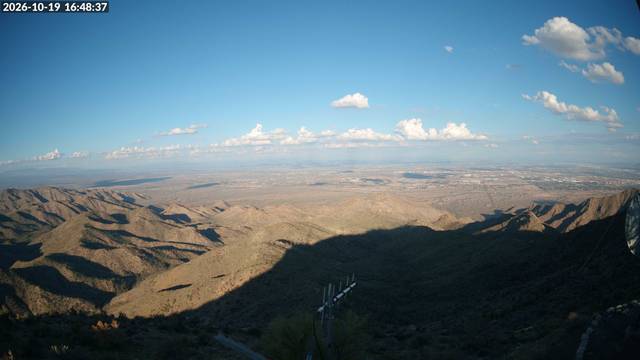
- A 4K PTZ camera at the White Tank Mountains site looking east across the West Valley — the wide shot frames the valley floor and sky.
- Live preview
- The panel shows a small 640×360 snapshot (~30 KB) refreshed about every 10 minutes; your browser quietly re-checks for a newer one every few minutes, so it stays current without a heavy video stream.
- Click for 4K
- Click the image to load the full-resolution 4K still (3840×2160, ~300 KB). A fresh 4K frame is captured about every 3 hours.
- Why two sizes
- A continuous 4K video feed would burn tens of gigabytes a day over the site's satellite uplink. Sending a tiny preview every few minutes plus a full 4K still every few hours adds up to only a few megabytes a day — the same view for a tiny fraction of the bandwidth — and the big 4K image is fetched only when you ask for it.
- Captured
- Local Arizona time of the latest snapshot. "Live" means the most recent capture is fresh; "Last snapshot" means it has aged out.
- 2 m VHF
- Kenwood NXR-1700 repeater. Its live frequency is on the AllStar tile’s 2m box; while the site is in bring-up this tile shows it too, with the offset.
- 70 cm UHF
- Kenwood NXR-1800 repeater. Its live frequency is on the AllStar tile’s 70cm box; while the site is in bring-up this tile shows it too, with the offset.
- Online
- The controller is reporting a fresh heartbeat. ON AIR shows while the radio reports it is transmitting.
- Access
- Controls show for everyone but stay greyed unless you’re signed in with the right role. The server re-checks either way, so the greying is only a hint.
- Channel
- Picks the radio’s active channel (1–32) — each is a preset frequency / tone / power profile programmed in the radio. Channel and frequency show only while the site is in bring-up; at go-live they retire from this tile.
- Low Power
- Drops the transmitter from full output to a reduced level. Full is about 40 W — 25 W on a sustained key — on the 70 cm (NXR-1800); the 2 m runs in the same ~40 W class. The low level is set per channel in the radio. The ● / ○ mirrors the radio’s real state from telemetry — it tracks changes made on-site too, and “…” means a command is still settling (the mirror rides a ~60 s scrape).
- Duplex badge
- The ADR-0011 drift guard. The repeat itself runs in the node software (app_rpt), and the Kenwood must sit in Operation Mode: Duplex for that chain to work — the badge compares the two: duplex ✓ means the proven pair, duplex drift means they disagree (a codeplug restore can silently revert the radio), and duplex ? means one half is missing or stale — never shown as healthy. Live: it refreshes as each side reports.
- Where did the knobs go?
- PL, the operator toggle wall and the service plane retired from this tile on purpose: the values are still collected in telemetry for diagnosis, service health lives on the AllStar tile (the box verdict), and the never-verifiable Kenwood service buttons were replaced by PDU power control, whose actions do read back. Each radio’s temperature and voltage are on the tile — select one to graph it below.
- Backhaul
- The internet link that carries the site's data to and from the repeater. This site uses Starlink satellite as its backhaul.
- Latency
- Round-trip time, in milliseconds, to Starlink's ground network. Lower is better — it tracks how responsive the link feels.
- Down · Up
- Current download and upload throughput in megabits per second. These rise and fall with traffic and satellite conditions.
- Obstruction
- The share of the dish's sky view blocked by terrain, trees, or structures. Near zero is healthy; higher values mean dropouts.